Understand the basics
Start from zero: candles, trading terms, timeframes, orders and what risk really means.
Start beginner guide →English · Español · Português · Français — beginner roadmap, demo setup and quizzes
New to trading? Start here. We'll guide you through your device, apps, videos, lessons and demo practice—one step at a time. No deposit required to learn.
Continue learning →Educational access is free. Demo practice is recommended before considering live trading. CRC may earn a commission from optional Genesis registrations.
Follow a beginner-friendly setup checklist, then complete a seven-day education challenge. No deposit required. CRC may earn commissions if eligible referrals later trade live.
Start Genesis demo walkthrough → Set up my device →A practical, self-paced trading academy built around CRC Concepts' documented approach to market structure, EMA pullbacks, confirmation entries, trade management, and prop-firm discipline.
Take the next step in your trading education by exploring Genesis FX Markets. Review its platform, account options, and trading conditions to decide whether it's right for you.
Explore Genesis FX Markets ↗CRC Concepts is a Genesis FX Markets referral partner and may receive compensation for registrations through this link. Trading risks & full disclosures.
A brokerage account is not required to use CRC Trading Academy.
Follow these steps in order. No broker account or deposit is required to access the lessons, quizzes or simulated tools.
Start from zero: candles, trading terms, timeframes, orders and what risk really means.
Start beginner guide →Configure the 13/50/200 EMAs and practice completed-candle entries on 1m and 5m charts.
Open interactive practice →Complete the assessments, keep a practice journal and check your risk before every trade.
View lessons and quizzes →After learning the basics, you can review Genesis account types, platform access, demo availability, fees and trading conditions. This is optional; you can complete the entire academy without signing up or depositing.
Explore Genesis registration ↗Keep practicing free →Referral disclosure: CRC may earn compensation if you register or trade through this link, at no stated additional charge from CRC. Verify all broker fees and terms independently. Trading involves risk.
Never traded before? Follow these steps in order. You'll learn the words, see how orders work, create a practice account if available, and place your first demo trade using virtual money. You don't need to deposit real funds to learn the lessons here.
Trading means buying or selling a market with the goal of benefiting from a price move. Prices can move against you. A buy/long position benefits if price rises; a sell/short position benefits if price falls. Both can lose money.
Markets include currencies (forex), gold, stock indices and futures. Each has different trading hours, pricing and risks.
Open Trading Foundations →Use the CRC Genesis registration link below. If Genesis offers demo accounts for your region and platform, choose Demo / Practice and virtual funds, not a live funded account.
CRC referral link; CRC may earn compensation. Demo availability, platform and setup screens are not independently verified. If demo is unavailable, use the site's built-in practice tools instead. Disclosures.
A candlestick shows four prices during a timeframe: open, high, low and close. A green/up candle generally closes above its open; a red/down candle below. A 1-minute candle covers one minute.
Learn trend direction, higher highs/lows, support and resistance, then CRC's 13 / 50 / 200 EMA framework. An EMA is a moving average that weights recent prices more heavily.
Learn the EMA framework →Never guess at lot sizes or leverage. Contract values and minimum order sizes vary by market and broker.
Open risk calculator →The CRC practice tool teaches decision-making; it does not place brokerage orders or replicate the Genesis interface.
Practice recognizing a trend, waiting for a pullback and confirmation, setting a stop, and recording why you entered. Review losing trades as carefully as winners. Practice consistently before even considering live funds.
Use CRC's trade journal and lessons. There is no required deposit, promised return or fixed number of practice trades that makes live trading safe.
Tap any term to reveal its meaning.
Trading one currency against another, such as EUR/USD.
A measure of a group of stocks, such as the Nasdaq-100 or Dow Jones Industrial Average. Index-linked products differ.
A chart bar showing open, high, low and close for a chosen period.
Units of price movement. Their monetary value depends on the instrument and trade size.
A unit used to size a trade. Its value varies across products.
The difference between the quoted buying and selling prices, a potential trading cost.
Using a relatively small amount of margin to control larger exposure. It magnifies losses as well as gains.
Funds required to open or maintain a leveraged position; it is not the maximum amount you can lose.
An order intended to exit at a loss threshold. Execution can differ from the requested price.
An order or target to close a position when a favorable price is reached.
Compare potential gain to planned loss. If risking $5 to aim for $10, the target is 2R before costs.
A simulated trading account using virtual funds. Demo results don't predict live outcomes.
Which account should a complete beginner use first to practice without risking deposited money?
Mark each step as you finish. Checklist progress is stored only in this browser. CRC's course modules and other interactive tools remain available below.
Follow one instruction at a time. No experience or deposit required.
Instructions may vary with app updates. Download only from official sources. Practice on demo before considering live trading.
Step through illustrated one-minute candle examples to see the EMA trend filter, confirmed pullback, entry, protective stop, and 2R / 3R exits. These are teaching examples, not historical trades or live signals.
The example pauses at each stage so students can inspect the chart. Candle closes—not wick touches—determine the 13 EMA pullback and re-entry confirmation. Stops and target lines are illustrative.
Start with video 1 and move forward one step at a time. Finish each tutorial before unlocking the next. Your progress is saved on this device. These recordings show platform workflows; menus may change.
Watch the full tutorial, then select “Mark watched & continue.” You can replay any completed tutorial.
Continue with the 12 academy lessons, practice in a demo environment, and complete the knowledge assessments. You do not need a live account to learn.
Start academy module 1 → Open beginner practice lab →Access is not automatic. You must have an eligible, funded live Genesis account registered through CRC's referral link before requesting the private Pack Runna invitation and CRC Whop promo instructions. Demo accounts, screenshots alone, and simply finishing the lessons do not qualify. All academy lessons and practice tools remain free without a deposit.
Use the free lessons and demo practice. Live trading can cause substantial losses. Funding is optional and is not required for education.
Study the free academy →If you independently decide to open and fund a live account, review all fees, eligibility, withdrawal terms, and risk disclosures first.
Review Genesis registration ↗CRC manually checks referral and funded-live-account eligibility before sending any community invite or Whop promo instructions. Submission does not grant access.
Go to verification form ↓CRC may receive referral compensation from Genesis. Access depends on verification and community rules. Promo code FREE and Whop joining instructions are shared privately with approved applicants; they are not unlocked by this public website.
Trading begins with a defined entry, stop loss, position size and exit plan. If this page is displayed in a file preview that blocks JavaScript, open the downloaded HTML file in Safari or Chrome to access all 12 interactive lessons, quizzes and calculators.
Eight practical tools to support your learning. Practice features use hypothetical data, and progress is stored on this device unless exported.
Follow all seven original CRC tutorials with detailed translated step-by-step instructions and optional read-aloud. Original video audio remains in English.
Open multilingual video guides →Third-party TradingView chart; market data may be delayed. Chart and indicators depend on provider availability. No trade signals or execution.
Use the indicators menu to add EMA 13, EMA 50, EMA 200. This chart does not automatically apply your personal template.
Open full TradingView charts ↗Chart data is supplied by a third party. Verify symbols, spreads, prices, and trading hours independently.
Built from your existing CRC journal entries. Open the journal to record a trade.
R-based statistics are educational. Journal results are self-reported, not verified brokerage performance.
Seven practical mobile walkthroughs are available in the dedicated training center, including account access, TradeLocker setup, trade entry, management and withdrawals.
Watch the video training center →These are platform walkthroughs. Recorded screens may differ from the current interface; check official platform instructions before taking action.
Mark each day after you complete your practice checklist. No real-money trading is required.
Completion means practice tasks were checked, not profitability or certification.
Contract value varies by instrument, broker, account currency and lot size. Enter the correct USD-per-price-unit multiplier from your broker's specifications. This is not a broker-specific order-size recommendation.
Review upcoming CPI, NFP, FOMC announcements, rate decisions, and major market holidays.
Open Forex Factory calendar ↗Investing.com calendar ↗This site links to third-party calendars rather than claiming to show verified live events. Confirm your timezone, actual release times and impact ratings on the provider's page.
Simple printable text guides and a spreadsheet-friendly CSV template. These are educational worksheets, not investment advice or performance claims.
Tell CRC what you want to learn. This opens your email app with your application details; no information is uploaded to the website.
CRC Concepts may receive compensation when visitors register or trade using the Genesis FX Markets referral link. This relationship does not require students to open or fund an account to access CRC Trading Academy. CRC does not independently verify Genesis FX Markets' regulatory status, fees, eligibility or account protections; review the broker's own disclosures and terms before deciding to register.
Forex, futures, indices, and other leveraged trading products can result in substantial financial losses, including the loss of deposited funds and, for some products, additional liability. No profits, success rates, or investment outcomes are guaranteed. Examples and simulations on this site are educational, not verified live performance or personalized financial advice. Confirm broker and prop-firm terms directly before trading.
CRC CONCEPTS · COMPLETE BEGINNER FIELD GUIDE
This step-by-step companion takes you from installing a charting app to placing and reviewing a demo trade. Work through each chapter in order. All price drawings below are illustrative, not real-time signals.
TradingView is where you select symbols, switch between 1-minute and 5-minute candles, and configure indicators.
A demo trading account on your chosen execution platform (for example TradeLocker, if supported) is where you practice orders, stops and closing positions.
Keep an economic calendar, a trade journal, screenshots, and a position-size calculator. Always verify the instrument's contract value.
EMA 13: blue · ON
EMA 50: red · ON
EMA 200: white · ON
All other EMA plots in the supplied screenshots are OFF. Keep “Labels on price scale” and “Values in status line” ON; precision is Default.
Screenshot 1: “EMAS 200/50/6/3” with EMA50 enabled, EMA200/EMA9/EMA18 disabled. Screenshot 2: “EMAs 8, 13, 21, 55, 100, 200” with EMA13 and EMA200 enabled, other plots disabled. The screenshots do not show the authors or complete Inputs, so check each script's actual EMA lengths and source.
If you cannot locate the exact community scripts, use three built-in Exponential Moving Average indicators set to lengths 13, 50 and 200 with the same colors. Free-plan indicator limits and menus can vary.
1R is the dollar amount you planned to lose if the original stop is hit, not a fixed number of points. Example: $10 planned risk means +2R is +$20 on a full-size position before costs.
A half position closed at 2R and a half at 3R yields 2.5R gross if both targets fill. Real execution may differ.
Switch between the two entry timeframes and use the steps to study a schematic bullish EMA pullback. This is not a live price chart.
Step 1: Identify bullish trend context.
When does a 13 EMA reclaim count as confirmed in the example?
0 of 6 ready
Educational material only. This academy does not promise trading results. Trading leveraged products carries substantial risk, including loss of capital. Practice on demo and understand your broker's rules before considering live trading.
Start with chart basics, match the exact visible indicator setup, learn the order ticket, then prove your understanding on simulated trades. CRC entries are demonstrated on both 1-minute and 5-minute charts. The practice prices are synthetic, not live market quotes.
This lab supplements the 12 main academy modules and other practice tools above.
TradingView: charts and indicators. TradeLocker: an example execution interface, where available through a supported broker. A demo account: simulated orders. An economic calendar: scheduled news. A journal: review and improvement.
You do not need to deposit money to learn the charting steps. Confirm any broker is permitted in your jurisdiction and understand its fees and account terms.
One candle summarizes open, high, low and close for a chosen timeframe. Its body shows open-to-close; wicks show the extremes.
On 1m, each completed candle represents one minute; on 5m, each completed candle represents five minutes. Changing timeframe changes the signals.
An exponential moving average weights recent prices more heavily. The 13 reacts faster than the 50; the 200 provides slower trend context.
A long position benefits when price rises; a short benefits when price falls. Both can lose money.
Spread is the difference between buy and sell quotes. Slippage is execution at a different price than expected, especially around volatile news.
Price-movement units and order-size conventions vary by instrument and provider. Never assume the same dollar value for 1 point or 1 lot everywhere.
Margin is collateral for a leveraged position. Leverage increases exposure and can amplify losses. A small margin requirement is not a measure of safe risk.
A stop is an exit instruction intended to limit losses, but its fill can differ in fast markets. A take-profit order aims to exit at a target.
1R is the initial planned risk. 2R is twice that risk in potential profit. Drawdown is the decline from a previous equity or balance peak.
These are the two reference screenshots provided by CRC. The screenshots verify visible Style toggles and colors, not the scripts' authors or every value under Inputs. If a matching community script cannot be found, use three built-in EMAs with lengths 13, 50, and 200 and source set to Close.
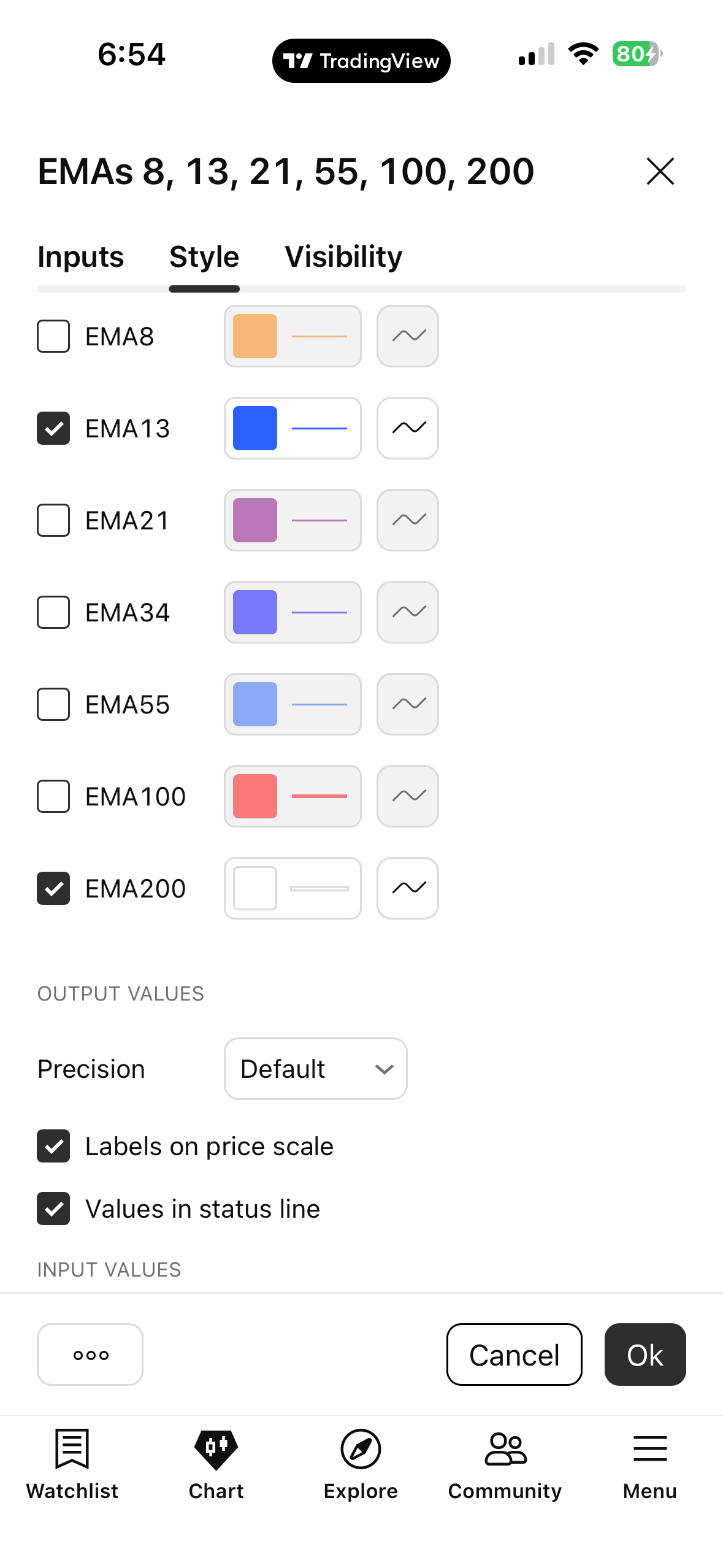
Reference image A — compare the enabled plots, labels, and color.
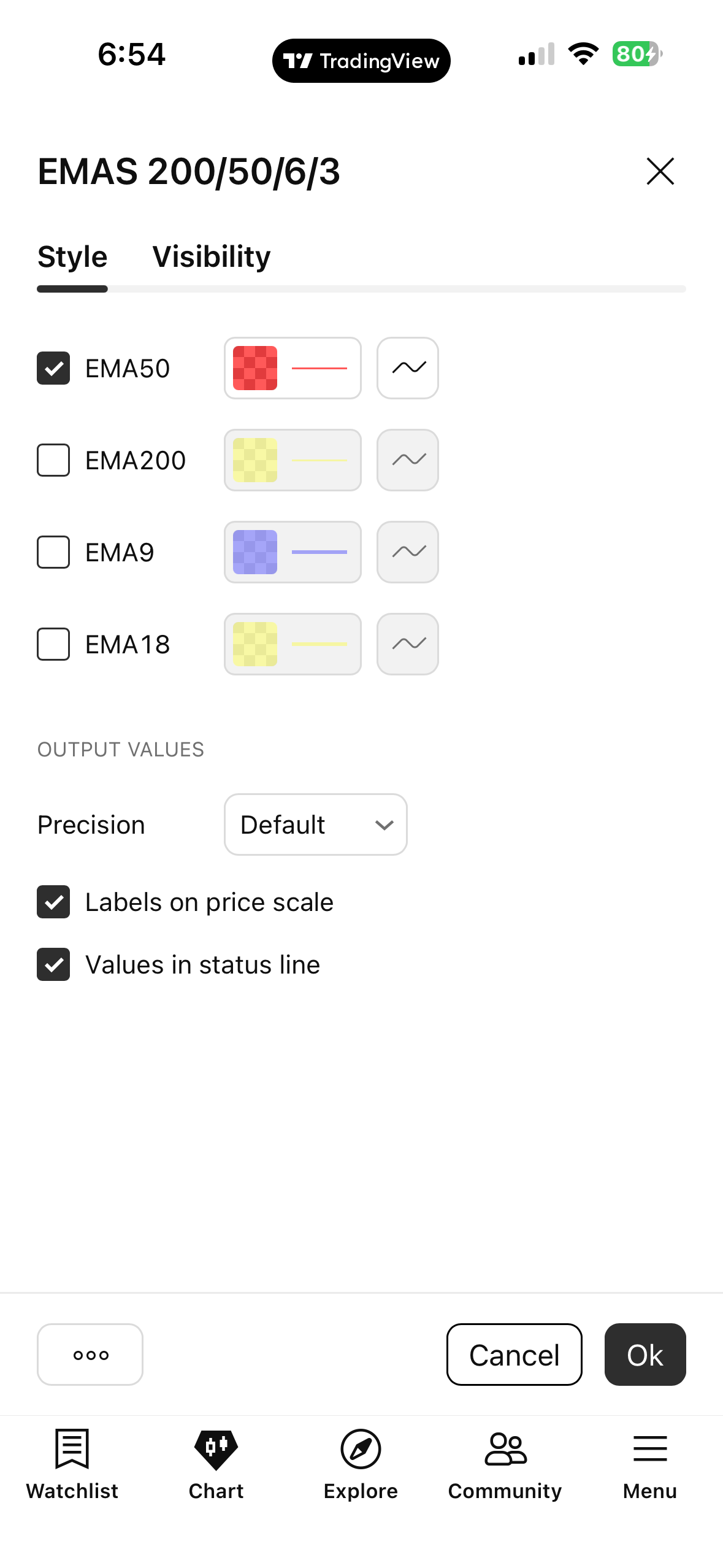
Reference image B — compare the enabled plots, labels, and color.
Exact button positions change across TradingView versions and mobile operating systems; look for the named controls rather than assuming fixed screen coordinates.
Check all five items once your own chart matches.
More signals may occur on 1m, but noise, transaction costs and false breakouts can be greater.
A 5m stop may be wider, which can require a smaller position. The site does not assume a 1m signal automatically validates a 5m entry.
Choose a timeframe and a scenario. The chart is illustrative. Decide whether a confirmed entry exists after the last candle finishes.
TradeLocker controls and broker permissions can differ. Practice without depositing funds first.
Enter the dollar value of a one-unit price move per 1 lot/contract from your actual broker specifications. This value cannot be safely guessed from the symbol alone.
Formula: risk dollars ÷ (absolute entry-to-stop distance × dollar value per price unit per lot). Quantity is rounded DOWN to the provided size increment. If below the broker minimum, skip the trade.
0 of 7 ready
Record: date/time, instrument, timeframe, screenshot, reason for entry, entry/stop/targets, risk in dollars, outcome in R, execution costs, and one lesson learned. Use the trade journal tool above to track results.
Answer all ten questions. You need at least 9/10 to pass this knowledge check. Passing means you understand the lesson concepts, not that you are ready to trade real money.
The indicator screenshots are genuine user-provided references, but the underlying Pine scripts and all Inputs are not shown. This website cannot verify that an unknown script matches your settings exactly. Screenshots of every TradeLocker screen and platform-specific tap sequence would require current captures from the relevant app version. This guide provides the steps and real indicator references without inventing interface screenshots.
Markets are risky. No entry pattern, indicator, or assessment guarantees profit. This academy is educational, not personalized investment advice. Check broker regulation and costs independently.
Yes. The lessons, simulated tools and assessments on this website are free to access. A separate broker registration is not required to use them.
No. Start with the learning material and simulated exercises. Only consider a live account after you understand the risks and have checked a broker's terms.
CRC teaches a 13, 50 and 200 EMA framework with trend context, pullbacks, completed-candle confirmation and predefined risk on 1-minute and 5-minute charts. Examples are educational, not trading signals.
No. Trading can cause substantial losses. A completed quiz or practice challenge is not proof of profitability or readiness for live trading.
No. Genesis is an optional referral partner. You can study the full academy without signing up, and should independently compare broker suitability, fees, regulation and demo access.